Thursday, March 25, 2021

What Entry Level IT Certifications Should you Get?

New to Information Technology and wondering what certification is best to get an entry-level job? There are so many options but which one is best or which one should I go with? That is how I felt when I was working in retail for many years and felt stuck in the cell phone industry selling phones, cases, and phone plans. I liked that industry but I knew I wanted a career in IT. 


Currently, I am a computer support technician and have been for about five years. I also did one year of help desk support and did a year as a contractor migrating Windows XP computers to Windows 7. After a few years in this field, I wanted to work on growing my knowledge and get a certification. 


I love my job but after six years in this role, I wanted to learn more about other technologies in IT. If you are new to computers and not sure where is the best place to start I would just go with the CompTIA A+ certification. CompTIA is a company that provides IT certifications on specifics technologies that are vendor-neutral. If you have no computer support experience or college degree that is okay I would highly recommend the CompTIA A+ first then the Network+. If you are not interested in networking maybe the Security+ or the Linux+. These certifications provide a good foundation for other roles and we all have to start somewhere.


The A+ certification is the best place to start if you haven't worked on or repaired computers. The A+ cert provides also the troubleshooting steps and how to go about repairing a computer operating system. Although it is not necessary there are some other certifications that you can go to if you are not wanting to get into the standard repair business. Other certification paths that I would recommend are vendor-specific certifications.


Vendor-specific certifications provide you with a concentrated knowledge and skill to help gain a position or job that is related to that specific certification. For example, if you get your Cisco Networking certifications you would most likely get a job as a Network Administrator or Network Engineer. If you are interested in some of my recommended certifications the list is below and why. Note these are in no particular order 


CompTIA A+

  Super beginner in computers. Jobs that can attain from this certification are Help Desk, Computer Support Technician, PC Repair Technician, and maybe Apple Genius Bar Technician. 


CompTIA Network+

  This is good to gain next-level knowledge after the A+ certification. This will be good to have if you want to work more with networking and support a small business. Also, this certification can help provide you with possible jobs like Junior Network Administrator or similar. Although this certification provides a large overview of networking I would recommend taking on a Cisco or Juniper Certification.


Cisco Certifications

  If you are interested in networking this is a way to go. I would also look into Juniper and Aruba Wireless certifications. These will get you better opportunities and skills to directly support their hardware. Even if a business you work for does not have their equipment installed I think it will provide you with similar knowledge in regards to installations and support. Plus Cisco is the king of networking. Two specific certifications that I am studying for are the Cisco CCNA and Juniper JNCIA. These are both associate-level certifications and would highly recommend looking into them.


VMware Certification

   I have gained some interest in this because if you are looking to work in a data center and see yourself supporting servers and virtual machines this could provide you with that knowledge. I think I might get this after I get my CCNA and/or JNCIA. Check out VMware for any free options of virtual machines. I currently set up a VMware ESXI computer and it's been fun to see how different systems work and are supported. Now I am not sure if I would recommend this for a true beginner but there is nothing that says one cannot go for it. 


AWS and/or Azure

   Cloud certifications are going to be the future and it's happening now. Many companies utilize these services to build servers or applications that help with their services. I haven’t done much on it but I know this would be a great place to learn more about it. My coworker just passed his AWS certification and is working towards Azure.  


Linux

   Many companies are going to Linux to create their servers and systems. (even Microsoft) Many data centers work only with Linux-based systems and having this is a must-have after you have completed other certifications. Why not. The more the better it is for you to build your resume. The certifications to look into are the Linux+ from CompTIA and RedHat. RedHat may be more popular in large data centers and the Linux+ may focus more on the Ubuntu operating system. Either way is fine but depends on what you want to do. I do not see myself now working in a data center and if I were to choose one I would probably do the Linux+.  


Google Certifications

  Now let us not forget Google has a path to certifications. I would recommend the IT Support certification for a true beginner. All of their paths are online at growing.google. Having that name will stand out on your resume and would recommend you look into their program.  


These certifications are just some suggestions to work with. I hope they provide you with some ideas to see what piques your interest. Work on a goal and list out several of your favorite certifications and systems. Do not complete just one path and stay there. Keep on learning. Technology is always changing and so will the tech companies. Currently, I am learning Linux and Python on the side but mainly studying for my Cisco CCNA certification. I feel as though both will provide me with some future opportunities and growth. In the end, think about your goals and what you want to achieve with the certification. This is about what value you can bring to yourself, your customers, and your company.


Keep on learning and keep on pushing. Don’t stop and continue... 


Check out my YouTube channel on the video I posted after I passed the CompTIA Network+ certification. There I provide some studying tools and tips. If you have any questions please leave a comment down below. 


Also, these are just recommendations and there is no right path. I learned by just opening a book digging into the content. Soon I found out that I was interested in networking and through that, I gain a high interest in Linux and Python. Do not worry about the person next to you. Do not worry if you are not up to the same level. Every technician started somewhere.  

Friday, March 12, 2021

My Approach to Studying for Cisco's CCNA Certification

Recently I announced that I am starting my journey to study for the CCNA certification. In November 2019 I passed the CompTIA Network+ certification. I was super excited then as I am now. The Network+ certification is my first IT-related certification. After leaving the testing site I knew that I wanted to get back to studying for the CCNA. Now I did take a long break with this but I knew in the back of my head I wanted to and needed to continue my growth. Let me get started with what I have been doing so far.


Before I do I will say that I am not sponsored by any of the vendors or websites presented below. 

Remember these are just some suggestions that may or may not work for you. Do not overthink this and just start studying. Even if it is for fifteen minutes a day that is more than what you did yesterday. Also, if you have any experience or recommendations other than what I have here please share your success or challenges below in the comment section. 


Use a Book as a Reference and Guide

I am currently using the Cisco CCNA 200-301 Official Cert Guide in ebook form. I also have the previous CCENT book. I found an article on Wendell Odom's blog that talks about using the CCENT books to study for the current CCNA exam. When reviewing both books I noticed most of the content is similar but got tired of carrying the large CCENT book around back and forth to work. I never thought I would like to read a book online or my iPad but it has some great benefits. Especially when you have to create some flashcards in Anki. More to come on that later.  

Having this book is an essential tool for my studies and I would recommend you get the e-book. Carrying the book around is a bit much. I am not a book worm at all but I never will forget a quote by J.K. Rowling, 

“If you don’t like to read, you haven’t found the right book.”.

Now, this is not the Queen's Gambit by Walter Tevis' book but I think it is important to have. I review some things that I might have missed before and use them to create flashcard questions. Along with the book print out Cisco's exam topics. Although the book may not have the exact details from that it is still important to use that as a guide. Hence the title of the book. 


CCNA Course Online

One of my favorite websites to use is Udemy. The site provides many options, the layout is nice and easy to use. My favorite teacher as of now is David Bombal. He also has great content on his website that provides free subnetting and binary quizzes. The main reason why I like his teaching method is that it is at a reasonable pace and can easily be understood. 


I tried learning from another trainer on LinkedIn Learning and could not watch more than two videos. It might work for you but the trainer was a bit too fast and very monotone. I tried searching on that site but could not find anything else for what I was looking for. Another option is to see what local training facilities provide live video training. This can be a bit expensive but if you are currently in a company check to see how much they can reimburse you for the course. I will be going to a live instructor video training at the end of March into April. I hope to get a great experience from this as this will be my first virtual live training. 


Personally taking this approach is expensive. Most CompTIA courses with a live instructor are on the lower end but some vendor-specific certifications like Cisco and VMWare, are really expensive. So I would not entirely recommend it unless you have the funds and/or your company is willing to reimburse you for it. Do whatever you need to do to gain growth and knowledge but know this is not the only way. Personally go through the self-study route as you can change and evolve your study schedule each day week and month plus it saves you money and if you do not have the time to sit in front of training for eight hours a day for five days then the self-study route is best. 


Take Notes?

I like to take notes but understand that it is not the best method to retain information. Does it help? Maybe... I am not a great note-taker but I like to physically write my thoughts and goals. I am a little old fashion and like the composition-style notebooks where the pages do not rip apart easily. If you do not like writing your notes go the digital route. I recently switched to a more digital approach to note-taking.
I never thought I would like this approach but I like taking notes in Microsoft OneNote.  

Another application that I recommend is Notion. The application is simple that provides options to create sub notes within a category. The app is available for all platforms including Mac, Windows, Android, and iOS. 

Taking notes is good but testing yourself is always best. What works for me is to write down what I learned and explain it in simple terms as though I am teaching a class. If I am reading the book I close the book after a chapter or paragraph and do my best to repeat what I read. I create my knowledge of notes from what I learned.


Use Flashcards!

While I am taking notes I will leave my flashcard application Anki open. If I find something that seems important or want to test myself later on it I will create a flashcard in the app. This is super important and a must-have throughout my studies. Also, a great reason to get the digital book to help copy and paste content. Use any flashcard app you prefer but I use Anki.

Repetition and Self Testing are Key!


One habit that I do daily to study takes my Cisco cert guide book with me to and from work. Every day I take it out from my book-bag and I set the book next to my keyboard on my desk. The same goes for when I return home. I take it out and put it on my desk next to my keyboard. This is a daily reminder that I need to study. Even if I don’t read every page in the book I am doing some reading online or working the flashcards to help remember what I have learned.


Another reason to continuously repeat is to engrave the content I have learned. This week in specific I set a goal to truly “master” subnetting and every day I did a little here and there. Not all days were great and I almost wanted to just get to where I felt comfortable but I knew that I had to work harder. Just like a bodybuilder pushes himself with repetition and gets to a point of muscle failure I too wanted to get to a point where I would “mastering” this new skill. 


My point is. Do not settle just for okay. Keep going just a bit more and repeat it. When you are learning something new it will take time to learn it but once you get the concept or idea you will see progress. When I started learning about networking when studying for the Network+ certification, I was clueless. It was not easy for me but now that I am studying the CCNA the content is easier to digest.  


Take Small Breaks from Studying

I have been working six days a week for almost a month and try to study every day at home and work during downtime. Even after just three chapters, videos and flashcards I felt burnt out. The other day I was so burnt out that I had to take a day off from studying at night when I got home from work.  
I almost felt like I did not achieve the amount of learning that I wanted. I want to push myself a bit more but know that it will take some time to grow. Then my wife told me to take the day off from studying. She said that even in college there is always a day in between classes to take a break from. So what I decided to do is to take at least one or two days a week to not study at night and to enjoy a nice movie, take a walk or play chess online. If bodybuilders have specific rest days for certain muscles we too should do the same for our studies.  

In conclusion. Just get up and start. Do not wait for someone to tell you to do it. Do not wait for someone like me to motivate you because you need to find your passion and sometimes it can be a bit to figure out what you are looking for in an IT career. Never tell yourself that you do not have enough time, because we all do. There is always enough time we just need to know how to prioritize it right and be consistent with it. 

Think about your goals. Right them down and start now. If you have any questions or comments please leave them down below and I will respond as soon as possible.

*These posts are of no intent to provide success in passing the CCNA certification. Everyone has their approach to studying for an exam and results will vary. These posts are my own experiences, opinions, and perspective. I always recommend people to seek professional guidance, training, and support for any IT-related studies or content. 

Monday, March 1, 2021

Studying for the Cisco CCNA Certification - (What is a Network?)


I am super excited to announce that I am studying for the Cisco CCNA 200-301 certification.  It has been at least a year since I passed by Network+ certification.  Now that things seem to be going back to some normalcy because my son's school is open and my daughter is back in daycare I am done taking a break from my studies and excited to learn about Cisco's entry level certification.

There are a few reasons why I want this but before I do I just wanted to provide you with my perspective on this journey.  What I will do is provide you with information I have learned and utilize the Cisco exam topics as a guide.   See below for an overview look of the Cisco CCNA exam topics.  

CCNA Exam Topics

1.0 Network Fundamentals 20%
2.0 Network Access 20%
3.0 Connectivity 25%
4.0 IP Services
5.0 Security Fundamentals 15%
6.0 Automation and Programmability 10%


Why am looking to take the CCNA exam and why am I posting what I learned on this page?  The honest truth is that after taking the CompTIA Network+ certification I knew I wanted to continue my studies in networking.  I had three different certifications I wanted to work on and the Cisco CCNA won. I wanted work on CCNA, Security+ or Linux+ but I wanted to concentrate more on networking.  

Now getting the certification is nice but I also want to get experience.  A goal of mine is to gain an opportunity as a Network Technician or Network Administrator.  Getting a certification is not the solution to this.  I must work hard to build relationships and connections with people in the network support community.

I am always looking at jobs postings to see what qualifications other network support positions "requirements".  And from what I have seen most "require" at least two to four years of hands on experience.  I think that is reasonable because after learning a bit about networking the network support manager and company cannot just trust a new person to support an entire university of switches and routers.  

Another reason why I am posting this is to keep myself accountable and to help others learn more about networking and information technology.  As most know that YouTube provides a great amount of options to watch and learn.  It is easy to watch a video about someone talking about networking but truth is we need a variety of learning options.  Hey, they helped me pass by Network+ certification.  Thank you Network Chuck, Professor Messer & Mike Meyers for the motivation and content you create each and every day. But I want to provide you simple and clean understanding of networking from my perspective, a computer support technician and by doing so I also work on reviewing the content I learned.

Think of it like when you read a chapter and at the end of the chapter you close the book and write down what you learned. This will help me in that regards.  That is what I did for my Network+ certification exam.  After each chapter or important subject I closed the book and tried to write down what I learned. This is going to be that kind of journey.  

Now on to what I learned on so far. 

First I would recommend buying a book to follow along. One of the books that I am using is the Official Cert Guide CCNA 200-201 Volume 1 by Wendell Odom.  Now I am not paid by them nor from Amazon but I included the link in this post.  Personally I am using OReilly books online, which is a first, since the Cisco press books are pretty heavy to carry around.  Plus my company uses OReilly and can get the book for free online.  If not I would have purchased the book personally and I still may buy the book because I prefer the hard book cover.  


Part 1: Intro to Networking

What is a network?

    A network is like communicating in a conversation or when two people are playing tennis. There are certain rules that computers and networks follow. There are protocols and in networking there are different network models on how a network is built. 

In the example from playing tennis.  Each player has a tennis racket but only one ball and of course the tennis court.  Let us pretend that the tennis racket is the computer and the tennis ball is an email or webpage.  Player 1 uses the tennis racket (computer) to request a webpage from lets say this website infotechyeti.com or google.com.  Once we hit enter on our computers is like player 1 hitting the ball to the other person.  

The tennis ball passes over the net, get it? No?  Okay...corny IT joke...then bounces on the ground and player 2 is ready to hit the ball to bounce it back to player 1 and hits the ball back.  Player 2 is the webpage or destination requested.  In other words it is just another computer or server.  

Whenever we make a requests from our mobile phone, tablet or computer we are just connecting from one computer to another one.  We press enter or go and the website comes back, like the tennis ball.  Continuously this happens within milliseconds and thus how we are able to get data super fast.  

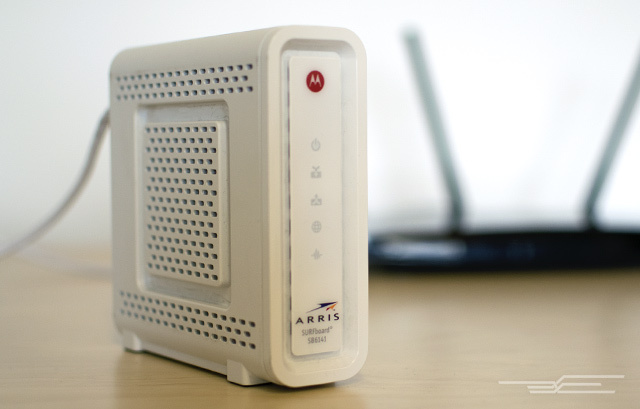
Now how does this all work?  Think about how our home internet is setup.  Some of us have internet at home with our preferred network provide like Comcast, Frontier, AT&T etc.  We have two all in one devices that are the Wi-Fi, router and switch all in one. 


What I have home is not an all in one setup like the Netgear you see here or the ones you probably get from your home internet provider.  Below is like what a large office might have setup where there is a router that connects to the internet world and a switch that manages the multiple computers within that office.  In all these things are a much bigger scale and much larger devices to manager large amounts of traffic and computers at once.  As you can see from our router and wifi I can only connect up to 4 computers at once via ethernet cable.  In a business they could be double or 10 times that. 

Home Modem (Router) Only

 Home Wi-Fi (Switch) Only


Now that we have the equipment set lets go on to how things get delivered and what models are there to determine the blueprint of a network. 

First how are messages or requests delivered.  First we have an IP address.  An IP address is similar to your home address. In order for us to know where to go we would need to know the specific mailing address and the GPS (router and switch) will provide us directions on how to get there the fastest. 

An example of an IP address is all numeric for example.  10.0.0.2 or 172.28.0.1 or 192.168.0.1

These numbers are attached to each and every computer inside your home or business.  Now I will not go into the whole world of IP addresses because that will be for another post but just for simple sake just know that each computer has an IP address and the router and switches know how to direct that traffic in and outside of the home or office. 

Now one thing I must mention is that a HUB and a SWITCH are two totally different devices.  A hub does not have any brain but a switch does.  A hub just repeats signals and information.  For example, if you had a hub setup in your home instead of the switch (see home wifi switch picture above) any time I would send an email to one person on my network it will send it to every device connected to that hub.  This is how it was long ago and of course that does not work well when working with confidential information.  Now we have switches which are pretty much computers that control the traffic to know where to tell it to go.

Routers on the other had make packet forwarding decisions.  For example if I had to send a letter to my wife who is in the house I dont need to go to the post office to have it delivered back to my house.  I would just go to her and give her the letter.  In some ways this is how a routers and switch work within the network.  It recognizes where things go and deliver them based on the IP address and locations.

How are IP addresses saved and stored? 

There is something called a MAC address.  (media access controller address)  This a unique identifier assigned the a network interface controller (NIC) that is built into ones computer, phone and/or tablet.  Every device has its own MAC address.  For example, if you have the network cable plugged directly into the modem/router in your home and you look behind your PC you may be able to see some lights blinking where the cable is connected.  That is the network interface card.  Now for Wi-Fi they have the same things and so do our phones.  For both Wi-Fi and also for their provider like Verizon, T-Mobile or AT&T.  

To search for what your IP address and MAC address are in your Windows computer go to the Command Prompt and type ipconfig /all

The example below is what results in that command prompt.  Can you locate the MAC and IP address? 

Ethernet adapter Ethernet:

   Connection-specific DNS Suffix  . : 
   Description . . . . . . . . . . . : Intel(R) Ethernet Connection (6) I219-V
   Physical Address. . . . . . . . . : 00-1A-22-33-44-B5
   DHCP Enabled. . . . . . . . . . . : Yes
   Autoconfiguration Enabled . . . . : Yes
   Link-local IPv6 Address . . . . . : (Preferred)
   IPv4 Address. . . . . . . . . . . : 172.28.0.5 (Preferred)
   Subnet Mask . . . . . . . . . . . : 255.255.255.0
   Lease Obtained. . . . . . . . . . : 
   Lease Expires . . . . . . . . . . : 
   Default Gateway . . . . . . . . . :
   DHCP Server . . . . . . . . . . . : 
   DHCPv6 IAID . . . . . . . . . . . :
   DHCPv6 Client DUID. . . . . . . . : 
   DNS Servers . . . . . . . . . . . : 
   Primary WINS Server . . . . . . . : 
   Secondary WINS Server . . . . . . : 
   NetBIOS over Tcpip. . . . . . . . : Disabled


On a Apple computer its a bit different but can locate them by going to System Preferences > Network > Wifi or Ethernet (depending which one you have connected) > Advanced > TCP/IP. 

There you will see the IPv4 Address and information.  To find the MAC address click on the Hardware tab.  Sometimes it may just show up on the previous page where you can see the Wi-Fi and other networks.  

See pictures below to help.  These are just examples I pulled from online but you can also type ifconfig in the terminal window to see how it shows up there. 


Well I hope this information has helped so far.  Next I will post about different network models and layers of the network.  

I may note that it is important to get information as I am doing directly from the source.  Remember that I am not an expert in networking and would always recommend you work on doing your own studies and not use this as the only content needed to study for any network exam.  Most of what I am posting here is me reviewing what I learned so far about networking. 

If you have any questions or comments please leave them below.  

Friday, February 12, 2021

Docking Station Walk Through | How to Connect Cables & Adapters to a Monitor

In my recent video I provide a simple walk through on a Lenovo docking station.  My goal was to go through each port on the back of a docking station to give people an understand on how to setup their workstation.  

Throughout I present all cables and connections.  I also provide a simple review of three StarTech adapters that are popular for people that need two or more monitors setup.  Truth is there is probably an adapter for almost any setup. 

I created this video because I have experienced conversations where some dont show enough confidence that their monitors are connected correct or not working. This video will hopefully provide that confidence needed to know that your setup at home or at the office is right.  

Check out the video.  Leave a comment for any questions and don't forget to subscribe. 

Thursday, February 4, 2021

Riwbox XBT 80 Headphones | Full Review & Impressions

The Riwbox XBT 80 wireless and wired headphones are reasonably priced headphones that provide a well balanced sound.  

The headphones have good bass and mids but could improve on the highs although not horrible compared to other brands within the price range.  

They provide different color options although I wish they just had an all black option.  Bluetooth connectivity is reliable and also include a really nice braded 3.5 mm cable with microphone built in. 

The plastic material is a soft matte finish but the head band is plastic all around which is a concern for me long term.  Since its all plastic they are nice and light weight compared to others I have tried.  They fold but do not twist and the headphones do not come with a traveling case.

In all these headphones are reasonable for the price and would recommend them if you do not mind that the head band is all plastic.  

Check out my recent video I uploaded to YouTube for the full review. 
 

Sunday, January 10, 2021

Mpow H7 Headphones Review | Best Budget Headphones under $20

The Mpow H7 wireless and wired headphones are truly the budget headphones and for the price the headphones provide a good amount of punch via Bluetooth and cable.

If you like bass get these headphones.  If there is something that they could improve on are the highs but overall the sound is reasonable.  

I was not impressed with the sound coming from watching a movie via Bluetooth.  I guess I was expecting a bit more punch as I had experienced with the music playback. I was watching an action movie and throughout I could not hear any good balance of sound   

The design is simple and the price is really attractive.  Connectivity is reliable but I did not do much testing with the microphone via bluetooth.  Honestly I do not rely much from my over ear headphones for Zoom, MS Teams or phone calls.  I have another set of in ear headphones that provide 4 microphones for better input quality. 

Mpow does include a nice carrying case but these headphones do not fold.  Not a huge issue but if your looking for more portability these may not be for you.  

They include a nice 2 year warranty but check their website for more information to confirm.  

Check out my recent video reviewing the Mpow H7 headphones on my YouTube channel.


Wednesday, December 30, 2020

How I Passed the CompTIA Network+ Certification | Tools, Tips and Resources

I took the CompTIA Network+ exam on November 8th, 2019 and passed!  I know this is a super late post but I still want to share my experience as a follow up from my YouTube video I created on that day.

Given that it was my first IT related certification I was nervous but excited at the same time.  I cannot remember the last time I studied for an important exam.  I read from others who took the exam that it was more challenging compared to the A+ and Security+.  I think what most said was because one had to memorize a lot of protocols and ports.  Regardless I still wanted to go for it because I was naturally curious about networking.  Being in a desktop support role now for my company I wanted to learn how systems communicate and how they are supported and configured.  I did not want the A+ certification because I was already in a computer support role and when reviewing the content I did not feel challenged. I thought about the Cisco CCNA certification but personally thought I was not ready for that.  So, if you are on the fence of which certification or IT path to go with leave a commend down below.

I think many are on the same when it comes to deciding which certification to work on.  My hope is that you can gain some guidance,  encouragement and inspiration with your IT related certification studies.  I will mention what books, video content and other resources I used to help me learn and practice for the exam.

For a book I decided to go with Exam Cram as a reference and guide.  The book provides crammed information on networking and is not very thorough.  It does however include a Cram Sheet and a free Pearson Vue practice test exam software.  I purchased this because I wanted a book that would not take up a lot space in my laptop bag plus it had decent reviews and was reasonably priced.  Another book I would recommend is Mike Meyers' Network+ book.  This book is larger to carry around but I would highly recommend it because goes a bit more in depth than the Exam Cram.  Half way through my studies I was able to get the Mike Meyers' book digitally and used that some times along side the Exam Cram book.  One recommendation before you go reading the book is to print the exam objectives provided by CompTIA.  This is a must have if you want to take your studies seriously.  It worked great as a checklist of what I needed to review and study.  My recommendation is that you buy one book as a reference because watching videos only will not help.


For video content I used several websites and started with LinkedIn Learning (previous called Lynda.com).  The videos I mainly saw on LinkedIn Learning were taught by Mike Meyers.  I liked his teachings so much that I went to Udemy.com to purchase his full course since LinkedIn learning did not have the full series.  I also purchased Jason Dion's Network+ course which included his practice exam. Both provide different teaching styles and offered great content.  Another website that I used was Skillsoft.  This site provides a ton of IT related content.  If you have the ability to get content from different instructors and websites do it.  I think it is important to have diversity while learning.  I learned better some topics from one instructor than the others and visa versa.  One person in mind that really helped is Professor Messer's CompTIA Network+ videos and website. He provides great content, study groups and pop quizzes.   Highly recommended! 


Along side YouTube videos I also listened to Podcasts related to networking on the road because reading books and watching videos was not enough.  It would take at least one hour to drive to work so I took that time to soak in as much content as possible.  But I still needed something else to help me retain the information for the exam because no matter how much I studied I was not able to successfully pass some chapters.  So I knew that I had to do something else to help me remember. 

The application I used is called Anki.  This is a free application available for Windows, Mac and Android that allows one to create decks of flashcards.  Thankfully at that time I had an android to get the free app because the iPhone app cost around $24.99.  I would say this app was the best tool I used to help study for my exam.  Any time I was in a waiting room, at lunch or home sitting on the couch while my wife watch the news I would go through some questions.  I reviewed them as much as I could in the morning, afternoon and right before bed.  I had to learn a lot of protocols, acronyms and port numbers for this exam and it worked great.  As simple as this may sound it really helped me retain a lot of the information needed to pass the exam.  My process of studying was simple.


I would read the chapter, close the book and do my best to write down as much as possible to see how much information I retained.  In addition I would continuously add questions in Anki as I went through the book.  Out of all of the recommended options this is a must have to for my studies. 

My study plan was simple
  • Study at least 1-2 hours per day
  • Take the Exam within 6 months
  • Lab every day (Cisco Packet Tracer)
  • Use Flashcards (Anki app or online)
  • Study 4-6 hours on the weekend (Sat and/or Sun)
  • Review practice test results after each chapter
 Simple enough I guess but if I did not get any questions right on the chapter I would review it and study more on that subject till I felt confident and passed the chapter exam.  As I got closer to my exam date I focused a lot of my time with using the Skillsoft practice exam and when I passed that exam I was confident to take the Net+ exam. I would recommend purchasing at least two practice exams for your studies to provide variety.

Before you get all motivated to start studying one really important step I want you to do do is.  I want you to actually go purchase the exam voucher and schedule an official test day.  Once I purchased the exam I knew that it would expire but I did not want to wait a full year to study and take an exam.  I gave myself a goal of six months of studying.  I believe I purchased the voucher in the spring and soon after wrote down a goal to take the exam at the end of October but no later than the second week of November. I really did not want to go into the holiday season studying.  Once I actually schedule a date for the exam I was super nervous but doing that really helped me to study more every night and weekend.  I was not perfect with my study plan but if I did miss studying during the summer I would make it up the next week.  I really needed to keep myself accountable. 

So I got my phone and I posted a picture on Instagram with the exam cram book to share that I was studying for the certification.  This not only helped to keep me accountable but also showed my friends and family that I was busy studying for an important exam.  Just the thought of telling people that I failed the exam was good motivation for me to study and lab every day. 

In all I will end with this. I wrote down my goals and why and would encourage you to do the same.  I had mine posted at home, work, in my car and in my notebook.  Create daily reoccurring reminders in your personal and work calendar to study for the exam.  One thing I did every day was bring my notebook and Exam Cram book to and from work.  I set them on my desk daily.  Some days I did not study at caring for my kids and home but I did that religiously to help.  Most nights were tiring but it was well worth the time. My best studying time was when I was not home and at a library or coffee shop studying on the weekend for almost six hours.  If I missed studying one weekend for a personal commitment I added more study time for next week.  In the end know what your why is.   Below are some reasons why I wanted this certification. 

  • I want to do it for myself
  • I want to further my career in IT
  • I want to do it for my wife and kids
  • I want to build my certification path and growth
  • I am curious and naturally interested in networking

What is next?  I am not sure but I know I will use what I learned to study for any future certification or exam.  I am thinking to go for Cisco's CCNA, Juniper JNCIA, Sec+ and/or Linux+. Good luck and do not stop learning. 

Feel free to add your suggestions and comments below or in my YouTube video.  Share your experiences, success stories and struggles.  Thank you.